I actually come from development. I originally started GymBo to get back into SwiftUI: programming myself, trying new things, catching up with the current state of the art. Along the way I quickly noticed that agentic coding helps enormously when I want to keep the pace high. The learning project gradually turned into the way I work today.
Today I develop several apps in parallel and on my own: FamilyManager, GymBo, Track4Kids and a few other projects. That only works because AI agents do a large part of the implementation. My role has shifted as a result: I decide, I review, and I step in when something goes wrong.
I’ve expanded this post into a kind of tutorial. If you want to build apps with Claude yourself, here you get a look inside the engine room: how the setup is built, which safety nets I’ve put in place, how a piece of code gets from an idea onto the test devices, and how I tell that something is really done. And also where things got stuck. At the end you’ll find a checklist you can use to build your own setup.
The flow at a glance
Before getting into the details, here’s the frame: the path of a change from branch to production. At the top, Claude and the agents work automatically; at the bottom, I decide deliberately by hand.
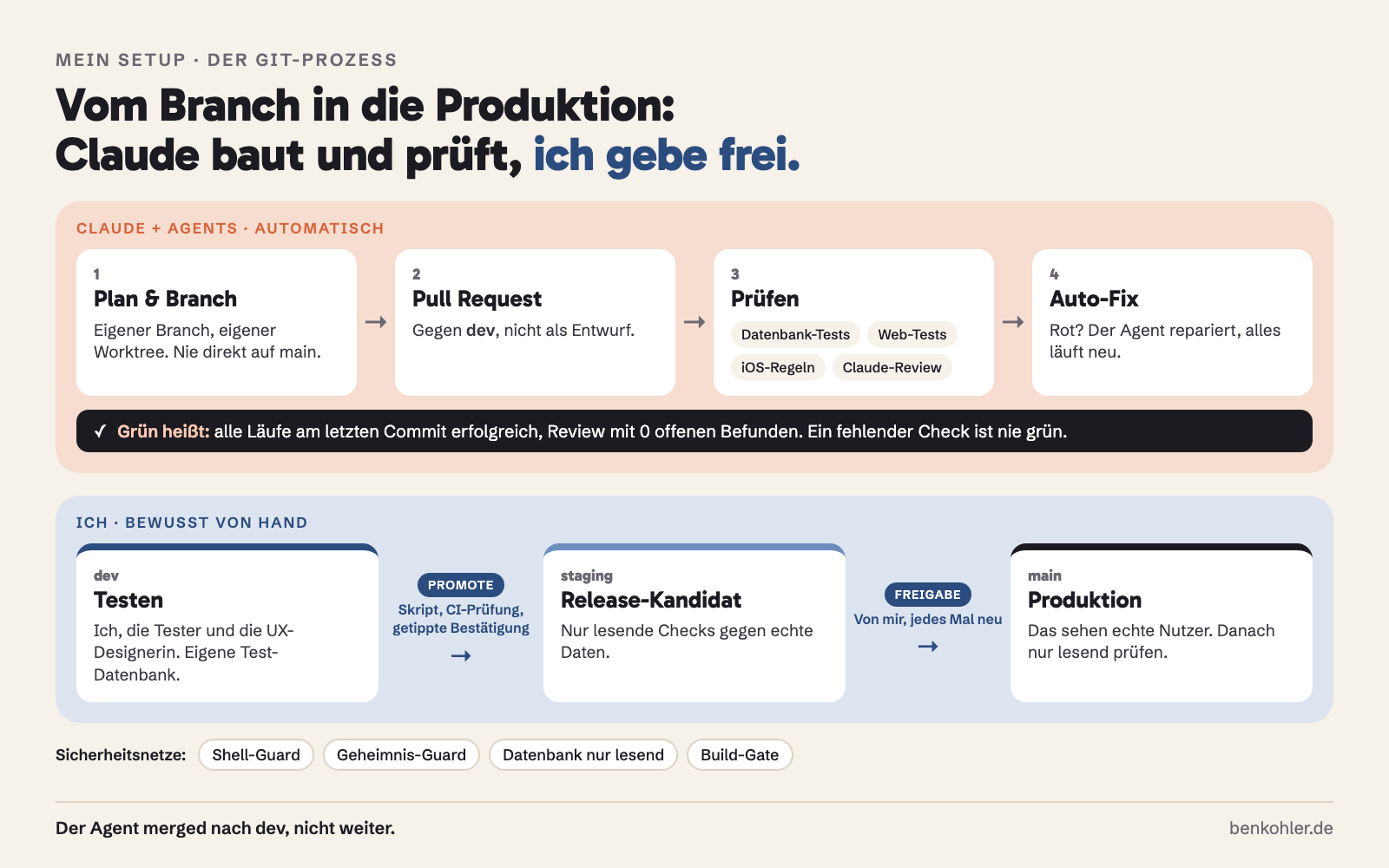
Everything that follows in this post serves one goal at its core: I want to be able to give the agents a lot of freedom without breaking something I can’t repair. That takes three things: clear rules, safety nets and verifiable evidence that something works.
Claude Code at the center
The center of my work is Claude Code. What the agent needs to know lives in CLAUDE.md files, on two levels. A global file applies to all projects: how I want to work, how bugs are analyzed, how things are built. On top of that, each project has its own file with architecture, build commands, colors and language rules.
The most important thing about them: almost every rule there has a story. It exists because something went wrong before. One example, which I now consider one of the most valuable rules: If a fix doesn’t work completely, the diagnosis was wrong, not the protection too weak. At the second fix for the same symptom, we stop and understand the problem anew, instead of putting yet another safeguard on top.
A few principles I work by:
- Plan first, then build. Anything with more than a few steps starts in Plan Mode. I read the plan before any code is written. If something goes wrong along the way, we stop and re-plan instead of pushing on.
- Subagents with clear roles. The strongest model plans, analyzes and reviews. Once the plan is set, a mid-sized model implements it. Pure searching, looking things up and evaluating logs is handled by the smallest and cheapest model. That keeps my head free for decisions, and the bill small.
- Skills for recurring workflows. For iOS I use the Axiom skill collection, and for App Store Connect skills around the command line tool
asc. On top of that come my own skills, for example one that publishes blog posts like this one. - Scheduled tasks. After a release, Claude checks on its own, for instance whether everything is still running stably after 48 hours, or how beta sign-ups are developing.
- No “done” without proof. Tests run, logs are checked, the change is compared against the main branch. The guiding question: would an experienced developer wave this through?
Safety nets: guards that don’t need to ask
Claude is allowed to do a lot without asking me, including Git commands and database queries. That makes everyday work fast, but it would be reckless without a net. My principle: Dangerous things aren’t forbidden, they’re caught mechanically. A rule in a text file can be overlooked or misread by an agent. A hook can’t be, because it runs before the command is executed.
These guards are active in my setup:
- Destructive command guard for the shell. Every command is checked in advance. Whatever can’t be undone is blocked: force-push,
git reset --hard, deleting uncommitted changes, orrm -rf. If the agent really wants to delete something, it has to explain what and why, and I run the command myself. - File guard for secrets.
.envfiles, configuration files with keys, and anything withcredentialsorsecretsin its path can’t be written by any agent. Templates like.env.examplestay free. The guard is fail-closed: if a call doesn’t make clear which file it affects, it’s blocked. - Database guard. The database tool can read and write, and with the same call. That’s why a hook checks every SQL statement itself: a statement has to be unambiguously read-only, otherwise it’s blocked. Reading on production is allowed, writing is not. A
SELECTblocked by mistake costs me one follow-up question; aDELETEthat slips through could cost far more. - Build gate. A queue that prevents several agents from building at the same time and freezing my machine (more on that below).
What matters to me is being honest about the limits. The file guard only sees the file tools; a write through the shell slips past it. It protects against an agent editing something by accident, not against malicious intent. That’s why it says so explicitly in its header. A guard that promises more than it delivers lulls you into false security.
On top of that come security checks in the code itself: a dedicated security reviewer as an agent for encryption, database access rules, authentication and webhooks, as well as automated checks in CI that verify, for example, that new database functions don’t get overly broad permissions. More on that shortly.
Controlling it from my phone
I don’t sit at my desk all day, and I don’t have to. My sessions run on the Mac, and through Remote Control I steer them from my iPhone. I see what the agent is doing, answer questions, give approvals, and get results like screenshots or reports straight on my phone.
In practice it’s a mix: some tasks I start on the Mac and keep following on the go, others run in the cloud. The division of labor is clear. On the go I make decisions; the Mac does the computing.
From rough layout to finished design
Before anything is built, I sketch in Figma roughly how a screen should look: rough layouts, arrangement and structure, nothing more. Claude Design then does the detailed work. The sketch becomes a fleshed-out draft with spacing, typography and details, which I review and adjust.
That draft is then directly the template for the implementation: Claude Code takes it and builds the screen in SwiftUI from it. There’s no translation by me between design and code anymore. That way my time goes into the question of what a screen should achieve, rather than into pushing pixels around.
Recently, someone with a professional eye has been looking at this as well, but more on that below.
Xcode and agentic coding
Claude builds and tests my apps from the command line with xcodebuild, not through the Xcode interface. Xcode is still part of my daily routine, though: some things I still program myself, especially when I’m polishing an interface or want to try something out directly. Agent and Xcode aren’t mutually exclusive. It depends on what gets me to the goal faster at that moment.
The most interesting lesson in this area had to do with hardware. My Mac has ten cores, and even a single Xcode build almost fully loads it. When several agents were building on different projects at the same time and each started a simulator, the system load climbed to around 1000, and the machine froze.
The solution is a small script that I call the build gate: a machine-wide queue that allows at most two builds at once. Everyone else waits until it’s their turn. The first version was more of a lottery, though. Short calls could slip past those who had been waiting a long time, and at some point a CI run ran into a timeout because of it. Today, slots are handed out strictly in the order in which callers arrive.
More rules around Xcode:
- Reuse simulators instead of creating a new one for every task. CI gets its own fixed device, after two projects shared a simulator and wrecked each other’s tests.
- Unambiguous destinations, meaning device and iOS version. Without a version, the destination is ambiguous, and the tests behave unpredictably.
- Swift Testing instead of XCTest for new unit tests.
The Git process: from branch to production
This is the part I’m asked about most often, so I’ll go through it step by step. The examples come from FamilyManager, the project with the strictest process.
Ground rule: nobody works on the protected branches
Neither I nor an agent commits directly to main or staging. Every task gets its own branch, usually in its own Git worktree. A worktree is a second working directory of the same repository: that way several agents can work on different tasks in parallel without overwriting each other’s files.
Three environments, three branches
The code moves through three stages. Each has its own branch and its own database:
| Stage | Branch | What it’s for |
|---|---|---|
| Dev | dev |
Every finished piece of work lands here. This is where I and the testers test. Own test database. |
| Staging | staging |
The exact, tested release candidate. |
| Production | main |
What users actually see. |
The separation is the core of the safety: whatever breaks on dev doesn’t hit a real user.
The path of a pull request
This is how a change goes, from idea to dev:
- Plan. Claude explains what will be changed and why. I approve or correct.
- Implementation in its own branch. The agent builds, tests locally and commits in small, individual steps.
- Cleanup before the PR. The changed code is reviewed for simplification and reuse. A review pass finds the things you don’t see while writing.
- Pull request against
dev. It’s opened as “ready”, not as a draft, because drafts don’t trigger the review for me. - Automated checks run. More on that shortly.
- Claude review. A second Claude reads the whole PR and checks it for correctness, security, encryption and database.
- Auto-fix. If something turns red or the review has a finding, the agent repairs it itself and the checks run again. I don’t have to sit next to it for that.
- All green at the current state? Then it’s merged into
dev. - I get notified: “It’s in dev now, you can test”, with a link to the PR and a note on what to look at.
I only test on dev and never want to have to ask whether something has arrived yet. That’s why the agent reaches out to me on its own.
When is a pull request “green”?
This is the most important question in the whole process, and I have a hard definition for it. A pull request may go into dev when all of the following conditions are met at the current latest commit (not at some older one):
- It’s open, not a draft, and its target is
dev. - GitHub reports no merge conflicts.
- The Claude review run is present and has completed successfully.
- The review explicitly reports zero open findings.
- All other check runs are complete and successful.
- The PR doesn’t itself change the review mechanism. Whoever changes the check must not check themselves.
And the rule behind it, which has cost me more tuition than any other: A missing check is never a green check. When a run isn’t started at all, GitHub often shows a reassuring green made of zero runs. That’s exactly what happened to me with Xcode Cloud (more on that below under CI). That’s why what counts for me isn’t what the interface shows, but a small tool that actively measures the conditions above and, when in doubt, reports “no statement”. In that case, nothing is merged.
An honest side note: GitHub can only partly enforce such rules for me technically. Since I have exceptions as the owner and all agents work with my access, the protection rules wouldn’t stop them. The burden of proof therefore lies with the tools and rules, not with the platform. If you work alone, you’ll be in a similar position. Plan for that.
Reviews: machine first, human last
I used to use two well-known review services. Both diligently reported “green” without my being convinced that they had really read the code. A review whose green means nothing is worse than none. Today the review runs through Claude Code itself, directly in the PR. It checks not only correctness, security, encryption and database, but also whether a change fits together on iOS and on the web. A feature that only arrives on one platform and isn’t noted anywhere as an open item counts as a finding.
The review doesn’t replace my judgment. It takes the grunt work off my hands, so that when testing I can concentrate on what only a human can judge.
From dev via staging to main
Here a boundary applies that I deliberately don’t delegate to the agents: the agent merges into dev, but no further. From dev to staging and from there to main, nothing is merged, it’s promoted, with a script. The script sets the target branches to the same commit atomically (fast-forward) and aborts if the history has diverged or the remote state has changed in the meantime. In addition, before the promotion it measures once more the CI state of exactly that commit. Only after that comes a confirmation that has to be typed out word for word.
For production there is also an explicit approval from me, every single time. An earlier approval doesn’t count. And the production script deliberately has no shortcut that skips the confirmation. On staging I only check read-only against real data, and after the release, production is likewise only read.
Testing: machines, humans and a UX designer
Good testing has two sides: automation that finds errors early and cheaply, and people who find what no automation expects.
Automated tests
Two rules have made my tests much better:
- A test for a bug has to fail before the fix. If it doesn’t turn red, it’s testing the wrong thing.
- Tests run with realistic history. Instead of a single record, I create several, the way they come about in real use. Many errors only show up once there is old data.
For FamilyManager, several checks then run in parallel on every pull request: database tests against a fresh local database, checks for the server functions (including whether new functions or tables have overly broad access rights), web checks with real browser tests, rules for the iOS source code, encryption checks against fixed test vectors, and the Claude review.
In CI I deliberately draw a line: I verify feature branches locally, and the complete iOS test suite in the cloud only runs where it counts before a release, namely on pull requests to staging and main.
Here too I paid tuition. The compute quota of Xcode Cloud is tied to the Apple account, not to the individual project, and all my apps share the same pot. When it was empty, runs were simply canceled. The tricky part: in GitHub they didn’t show up as red, but not at all. Since then, this has applied for me: A green pull request without an iOS result is not a green pull request.
Human testers
No automation replaces real people. That’s why I have testers who play through the apps in very different constellations: on different devices, in different situations, and along paths I didn’t think of while building. Especially with an app like FamilyManager, where several people with different roles work together, many errors only appear in the interplay. An agent tests what occurs to it. A human taps on whatever occurs to them, and those are rarely the same things.
New builds therefore land first on dev and, via TestFlight, with the testers. Claude collects and sorts their feedback, so that I have it prepared in front of me in the morning.
New on board: a UX designer
Recently I’ve had reinforcement: a UX designer goes through the views and flows together with me. She looks at whether everything fits together: whether a flow is logical, whether a screen reaches its goal, and whether the interface guides users at the points where they need help. That’s a perspective neither an agent nor I as the developer can reliably take, because we know the app too well.
The nice thing about it: her feedback can be fed directly into the process. Comments become tasks that Claude implements. I check the result on dev again, and we go through it together before it moves on.
Release
For App Store Connect I use the command line tool asc: TestFlight distribution, metadata, screenshots and submission for review. One trap that’s easy to fall into: if an app is built on a beta version of macOS, the App Store rejects it on submission, even when Xcode and the SDK are regular. For TestFlight this doesn’t matter. Before a store submission, I therefore check it in the finished build.
How the two of us do this together
When I say “Claude and I”, I mean a very concrete division of labor that has settled in over many weeks:
- I decide the what, Claude does the how. Which feature gets built, how it should feel and what gets left out, I determine. How it’s implemented technically, Claude proposes, and I read the plan.
- Claude may do a lot, but never unnoticed. Freedom exists within the guards. Anything that can’t be taken back goes through me.
- Claude reports in, I don’t have to ask. It tells me on its own when something is ready to test on
dev, or when something stays red and it can’t get further. Then it gives me the status and the blocker, instead of waving through something half-green. - Mistakes move into the rulebook. Every time something goes wrong, we write down the lesson, in the
CLAUDE.md, in a test or in a guard. That way Claude doesn’t make the same mistake twice, not even in the next session. - I stay responsible. The agent supplies evidence, I check it. “Done” only means it demonstrably works.
To rebuild: your starter setup
You don’t need to have everything at once. I started small too. This is the order I’d choose today:
- Create a
CLAUDE.md. Build commands, architecture, language rules and your two or three most important principles. Add a line after every mistake. - Never work on the main branch. Every task in its own branch, and with parallel agents in its own worktree.
- Set up a shell guard that blocks irreversible commands. This is the insurance with the best value for money.
- Protect secrets. A hook that forbids agents from writing
.envand key files. - Introduce a
devstage. Everything lands there first, never directly in production, with its own test database. - Pull requests with automated review and tests. Define in writing when “green” applies, and that a missing check is never green.
- Turn on auto-fix, so the agent repairs red checks itself.
- Production with a handbrake. Promotion only via script, with confirmation from you.
- Let real people test, and if you can, bring in someone with a UX eye.
- Write down the lessons, where your agent reads them.
Conclusion
My setup wasn’t drawn up on a drawing board, it grew, a little more with every mistake. The agents take a lot of implementation work off my hands, but the responsibility stays with me, and by now also with people who look at what a machine doesn’t see: testers who actually use the apps, and a UX designer who pays attention to flows and interfaces. If you develop with AI agents yourself, my most important tip is: write down your lessons, and do it where your agent reads them.